
Technology
How to Choose the Right Gaming Controller for PC Gaming: A Complete Guide for Pakistani Gamers

Jun
Introduction
If you’ve decided to level up your PC gaming experience beyond keyboard and mouse, choosing the right gaming controller can completely transform how you play. But with dozens of controllers available at different price points, it’s easy to feel overwhelmed especially if you’re shopping online in Pakistan where options, pricing, and availability vary significantly.
A good gaming controller isn’t just about having nice features or looking cool. It’s about responsiveness, comfort during long gaming sessions, build quality that lasts, and compatibility with the games you actually play. The wrong choice can leave you frustrated and your wallet lighter.
Whether you’re into racing games, action-adventure titles, fighting games, or third-person shooters, this guide will walk you through everything you need to know to make an informed decision. We’ll cover controller types, essential features, what matters for different gaming genres, and honest reviews of budget-friendly options available right now in Pakistan.
Understanding Gaming Controller Types for PC
Before diving into features, it helps to understand the main types of controllers available for PC gaming. Each has distinct advantages depending on your needs and gaming preferences.
Wired USB Controllers
Wired controllers connect directly to your PC through a USB cable. They’re reliable, require no battery charging, and offer zero input lag since the connection is direct and continuous.
Advantages:
- No latency or connection drops
- No battery management needed
- Usually more affordable
- Plug-and-play compatibility with most games
Disadvantages:
- Limited by cable length
- Less freedom of movement
- Cable can create desk clutter
Wired controllers are ideal if you’re sitting close to your PC and value reliability above all else. They’re excellent for competitive gaming where every millisecond matters.
Wireless Controllers with Proprietary Dongles
These controllers use manufacturer-specific wireless technology (like Xbox’s 2.4GHz wireless or PlayStation adapters). They connect via a USB dongle that stays plugged into your PC.
Advantages:
- Freedom of movement without cables
- Very low latency (nearly imperceptible from wired)
- Professional-grade reliability
- Good range (usually 10-20 meters)
Disadvantages:
- Require battery charging
- Slightly higher initial cost
- Need compatible dongle
This type is perfect for casual gaming, couch gaming setups, or when you want flexibility without sacrificing responsiveness.
Bluetooth Controllers
These use standard Bluetooth connectivity and work with most modern PCs, laptops, and even smartphones.
Advantages:
- Universal compatibility
- No additional hardware needed
- Convenient wireless connectivity
Disadvantages:
- Slightly higher latency than proprietary wireless
- Variable range depending on interference
- Battery management required
Essential Features to Consider When Choosing a Controller
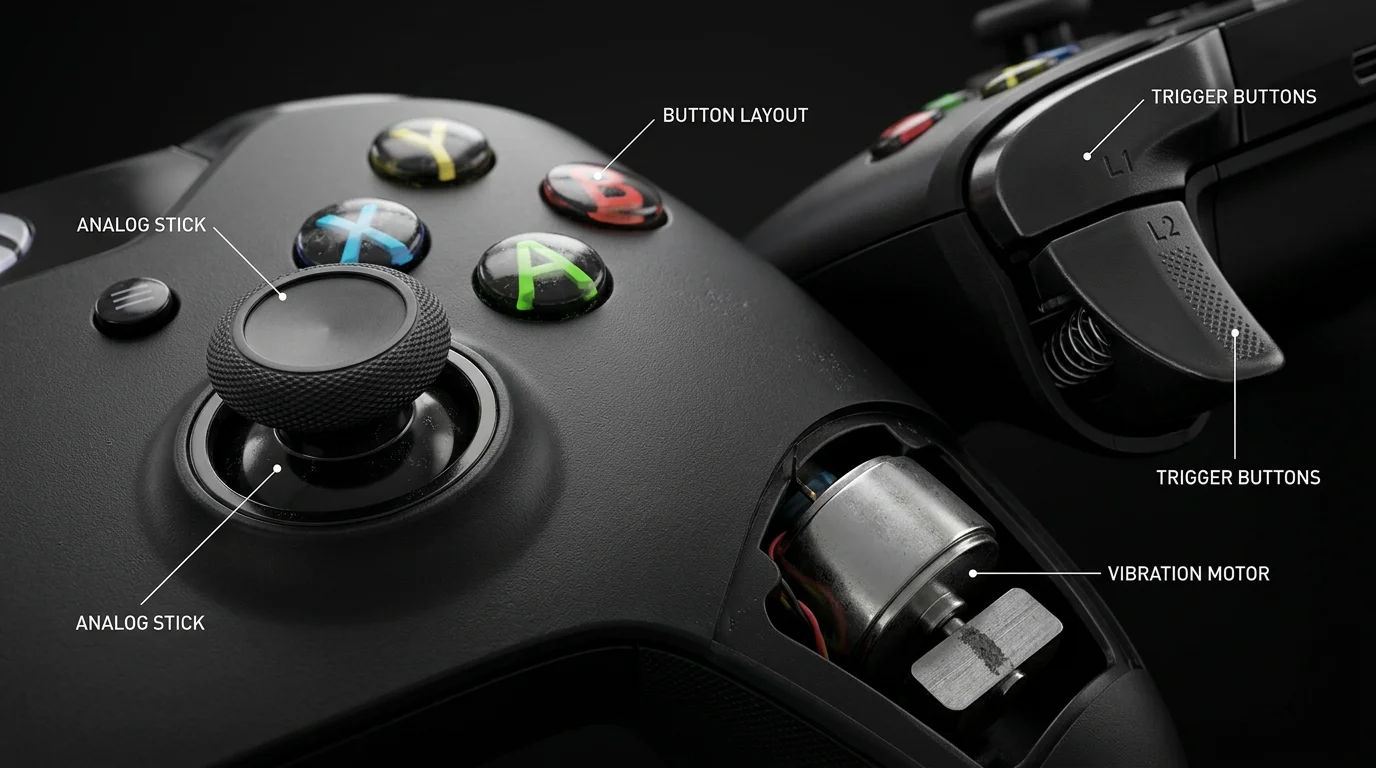
Not all gaming controllers are created equal. Here are the critical features that should influence your decision.
Button Layout and Feel
The button layout significantly affects how natural gaming feels. Different layouts suit different hand sizes and gaming styles.
- Xbox-style layout (asymmetrical analog sticks, buttons higher) – feels natural for most gamers, widely supported by games
- PlayStation-style layout (symmetrical sticks, buttons positioned differently) – some gamers prefer this for thumb positioning
- Button response – should feel crisp and responsive without being too stiff
Press the buttons physically if possible before buying. A controller that feels cheap will eventually wear out faster, and the tactile feedback while gaming matters more than you’d think.
Analog Sticks Quality
Your analog sticks will get the most abuse during gaming. This is where build quality really matters.
Look for:
- Smooth, responsive movement without dead zones
- Durable materials that won’t develop stick drift (the common issue where sticks register input without touching)
- Adequate grip texture
- Full range of motion
Stick drift is incredibly frustrating—imagine playing a shooting game and your crosshair slowly drifting without you touching the stick. This happens with cheap controllers after a few months of use. Mid-range and quality controllers have better materials and engineering to prevent this.
Haptic Feedback and Vibration
Vibration (haptic feedback) adds immersion to gaming—you feel impacts, collisions, and environmental feedback through the controller.
Types:
- Dual motors – two independent vibration motors providing varied, nuanced feedback
- Single motor – basic vibration, less immersive but sufficient for most games
- Trigger feedback – some controllers vibrate the triggers themselves, adding another dimension
For racing games and action titles, dual-motor vibration significantly enhances the experience. For strategy or turn-based games, vibration is less critical.
Trigger Design
Different games use triggers differently. Some allow you to customize trigger sensitivity.
Consider:
- Are triggers pressure-sensitive? (important for racing games)
- Is the travel distance comfortable for your play style?
- Do they have any dead zone settings?
- Are they responsive and quick to register?
Ergonomics and Grip
You’ll hold this controller for hours. Comfort matters.
Key factors:
- Hand size compatibility (does it fit your hands naturally?)
- Weight distribution (does it feel balanced?)
- Grip texture (non-slip material?)
- Button placement (can you reach all buttons comfortably?)
A controller that feels awkward during a 30-minute session will be torture during a 5-hour gaming marathon.
Build Quality and Durability
This is where you often get what you pay for. Quality controllers have:
- Reinforced cable connections
- Better material composition
- Tighter button tolerances
- Higher-quality analog stick components
Cheap controllers might work fine initially, but they’re prone to premature failure. A slightly more expensive controller that lasts 3-4 years is better value than a budget option that fails after 6 months.
Best Gaming Controllers in Pakistan (Quick Picks)
| Controller | Type | Best For | Price |
|---|---|---|---|
| L3000 | Wired | Budget Beginners | Rs 1590 |
| LANJUE L4000 | Wired | Regular Gamers | Rs 1730 |
| Xbox 360 Wired | Pro | Competitive | Rs 2410 |
View All Gaming Controllers in Pakistan
Controller Types for Different Gaming Genres
Different games benefit from different controller characteristics.
Racing and Simulation Games
Need: Precise trigger control, responsive analog sticks, vibration feedback
Racing games demand accurate steering and braking control. Your trigger sensitivity matters hugely here. Dual-motor vibration helps you “feel” the road and tire grip. Look for controllers with smooth, progressive triggers without excessive dead zones.
Action and Adventure Games
Need: Responsive buttons, good ergonomics, vibration for immersion
Games like God of War alternatives or adventure titles need quick button response and comfortable holds for extended play. Vibration enhances combat feedback. Stick precision matters for camera control.
Fighting Games
Need: Responsive buttons, precise stick control, minimal input lag
Fighting games are unforgiving about responsiveness. Button presses need to register instantly. Wired connections are preferred by competitive players. Some prefer controllers with arcade-style stick layouts.
Strategy and Turn-Based Games
Need: Comfortable hold, responsive buttons, vibration optional
These games don’t demand ultra-low latency. Comfort and button accessibility matter more. Wireless works fine since there’s no time pressure.
First-Person Shooters
Need: Low latency, responsive sticks for aiming, good ergonomics
Precision and responsiveness are critical. Wired controllers or high-quality wireless options with minimal latency. Stick sensitivity and customization matter greatly.
Budget-Friendly Gaming Controller Options in Pakistan
Now let’s talk about actual options available in Pakistan for beginners and intermediate gamers with mid-range budgets.
L-3000 Game Pad – Twin Motor Vibration Option
Price: PKR 1,590
The L-3000 Game Pad is an excellent budget entry point for PC gaming in Pakistan. At under 1,600 rupees, it offers solid fundamentals without breaking your budget.
What You Get:
- Wired USB connection (reliable, no battery concerns)
- Dual-motor vibration for immersive feedback
- Standard button layout that works with most games
- Basic but functional analog sticks
Best For:
- Beginners just getting into controller gaming
- Casual gaming sessions
- Games where precise control isn’t critical
- Gamers who want to test if controller gaming is for them before investing more
Limitations: As with most budget controllers, the build quality is adequate rather than premium. It will work well for months, but the analog sticks may develop issues after extended heavy use. The vibration motors, while present, aren’t as refined as higher-end options.
This is a smart choice if you’re uncertain whether you’ll stick with controller gaming or if you’re gaming casually a few hours a week.
LANJUE APUS GAMEPAD L4000 – USB Joystick for PC
Price: PKR 1,730
The LANJUE APUS L4000 sits just slightly above the L-3000 in price but brings some meaningful improvements.
What You Get:
- Wired USB connection with decent cable length
- Responsive analog sticks with better durability
- Standard controller layout compatible with most PC games
- Improved build quality compared to ultra-budget options
- Better ergonomics for extended gaming
Best For:
- Intermediate gamers who game 4-6 hours weekly
- Players wanting better durability than absolute budget options
- All gaming genres (versatile controller)
- Gamers in Pakistan looking for reliable Pakistani-compatible controllers
Performance: The L4000 offers noticeably better stick response and more durable construction. If you’re playing action games or anything requiring precision, the improvement over the L-3000 is worth the extra 140 rupees.
This is the sweet spot for value in the budget category—it balances cost with meaningful quality improvements.
Microsoft Xbox 360 Wired Controller for PC
Price: PKR 2,410
The Xbox 360 controller is a classic for a reason. It’s been the standard for PC gaming for over a decade.
What You Get:
- Legendary reliability and compatibility
- Wired connection with excellent build quality
- Standard Xbox button layout (universally recognized)
- Responsive analog sticks and buttons
- Compatible with virtually every PC game
Why Gamers Choose It: The Xbox 360 controller became the PC gaming standard because it works flawlessly. Game developers optimize for it. The button layout feels natural. It’s durable and holds up to heavy use.
Best For:
- Gamers who want a proven, reliable option
- Intermediate to advanced players
- Anyone who’s unsure and wants a “safe choice”
- Long gaming sessions where durability matters
Considerations: It’s more expensive than budget options, but you’re paying for reliability and compatibility. Many PC gamers still use Xbox 360 controllers because they simply work.
Xbox 360 Wireless Controller with Dongle
Price: PKR 3,980
This is the wireless version of the beloved Xbox 360 controller.
What You Get:
- All the reliability of the wired 360 controller
- Wireless freedom (no cable tethering)
- USB wireless dongle included
- Better ergonomics for extended play
- Professional-grade responsiveness
Best For:
- Gamers with desk setups where cable freedom matters
- Couch gaming or distance from PC
- Intermediate and advanced players
- Anyone wanting the best balance of reliability and flexibility
Why the Price Jump: The wireless technology, dongle, and batteries add cost. However, you’re getting a controller that professionals use, combined with wireless convenience.
Battery Consideration: The controller runs on AA batteries. You can use rechargeable batteries to reduce long-term costs. Keep spares charged for uninterrupted gaming.
Matching Your Choice to Your Situation
Let’s make this practical. Here’s how to decide based on your specific circumstances:
If You’re Completely New to Controller Gaming
Start with the L-3000 or L4000. Spend 1,600-1,800 rupees to test the waters. If you love it and game regularly, upgrade later. If you discover controller gaming isn’t for you, you haven’t invested heavily.
If You Game 3-5 Hours Weekly
The LANJUE L4000 offers the best value. It’s durable enough for regular use, reliable, and affordable.
If You Game 5+ Hours Weekly or Competitively
Invest in the Xbox 360 Wired Controller. The reliability and compatibility justify the extra cost. Professional gamers across Pakistan use this controller because it performs.
If You Want Wireless Convenience and Durability
Go for the Xbox 360 Wireless. Yes, it’s the most expensive option here, but it combines the proven 360 reliability with wireless freedom.
If Budget Is Absolutely Tight
The L-3000 is your controller. It will work for casual gaming. Just manage your expectations about build quality.
Important Compatibility Considerations for Pakistani Gamers
When buying any controller in Pakistan, ensure:
- USB compatibility – All controllers listed above work with standard Windows PCs and laptops
- Driver support – Xbox controllers work immediately on Windows; cheaper controllers might need driver installation
- Return policy – Buy from retailers with good return policies in case of defects
- Warranty – Check if your controller has warranty coverage
- Local availability – Ensure the retailer can provide support if issues arise
Retailers like PKMall.pk stock multiple controller options specifically tested for Pakistani market compatibility.
Setting Up Your Controller: Quick Tips
Once you’ve chosen your controller, here are essential setup steps:
For Wired Controllers:
- Plug into USB port
- Windows typically recognizes immediately
- Verify in Game Controllers (search in Windows settings)
- Adjust dead zones if needed in individual game settings
For Wireless Controllers:
- Insert batteries or charge
- Plug USB dongle into PC
- Press pairing button on controller
- Wait for LED confirmation
- Test in Game Controllers settings
Optimizing Performance:
- Disable other USB devices if experiencing lag
- Update controller drivers from manufacturer website
- Adjust stick sensitivity and dead zones per game
- Use Xbox Controller Companion app for sensitivity fine-tuning
Maintenance Tips to Extend Controller Life
A gaming controller is an investment. Protect it:
- Keep it clean – Avoid dust and debris in stick mechanisms
- Proper cable management – Don’t yank cables abruptly
- Avoid extreme temperatures – Don’t leave in direct sunlight or cold
- Careful stick usage – Avoid grinding or extreme pressure
- Regular breaks – Extended sessions cause faster wear
- Store properly – Keep in a dry, dust-free place
Frequently Asked Questions
Q: Will a gaming controller work with all my PC games? A: Most modern games support controllers. Older games or strategy games might not. Check Steam or the game publisher’s page before buying. Wired controllers have better universal compatibility.
Q: Is wireless or wired better for PC gaming? A: Wired is technically superior for competitive gaming (zero latency). Wireless is more convenient and sufficient for casual to intermediate gaming. Choose based on your priority.
Q: What’s the difference between a PS3 controller and Xbox controller for PC? A: Button layout differs. Both work on PC, but Xbox layout has better native Windows compatibility. It’s more about personal preference on which button arrangement feels natural.
Q: How long do gaming controllers typically last? A: Budget controllers (1-2 years with heavy use). Mid-range controllers (2-4 years). Quality controllers (4+ years). Much depends on build quality and usage intensity.
Q: Can I use a PlayStation controller on PC? A: Yes, via Bluetooth or USB adapter. However, Xbox controllers have more native compatibility with Windows and games.
Q: Should I buy an expensive controller if I’m just starting? A: No. Start budget-friendly. If you find yourself gaming regularly and want to invest more, upgrade then. Many gamers discover they prefer certain features only after experience.
Q: What does “dead zone” mean? A: It’s the small movement range where stick input isn’t registered. A large dead zone means you have to move the stick more before the game responds. Good controllers have smaller, tighter dead zones.
Q: Are cheaper controllers really that bad? A: They work initially, but durability is questionable. Stick drift is common. If you game casually (5 hours monthly), they’re fine. For regular gaming, the extra investment in mid-range pays off.
Q: Can I customize controller sensitivity? A: Yes. Most games allow sensitivity adjustment in settings. Some controllers also have software for customization. Windows Game Controller settings let you test sensitivity.
Q: What about controller latency? Will I notice the difference? A: In competitive games, yes—wired controllers have zero latency. In casual games, no—you won’t notice wireless latency. For most gamers, wireless works great unless playing competitive shooters.
Q: How do I know if my controller has stick drift? A: If the cursor or character moves without touching the stick, or if you have to recalibrate frequently, you likely have stick drift. This develops gradually with use.
Final Recommendations: Making Your Choice
Choosing a gaming controller is personal, but here’s my expert recommendation framework:
Start with the L-3000 or L4000 (PKR 1,600–1,800) if you’re curious about controller gaming but not sure it’s for you. These give you the experience without heavy investment.
Step up to Xbox 360 Wired (PKR 2,400) once you’re gaming regularly and want durability combined with universal compatibility.
Go wireless with Xbox 360 (PKR 3,980) when you want the reliability of the 360 combined with the convenience of wireless play.
The best controller is the one that fits your hands, matches your gaming style, and lasts long enough to become second nature. Don’t overthink it, but don’t cheap out on build quality if you’re gaming seriously.
